Construction Daily Logs and To-Dos That Actually Get Used
Give your crew clear task lists. Get real-time progress updates. Keep a daily record of every job site without paper forms.
Schedule a Demo
Nothing Missed Means Happier Customers
Missed steps are costly. A forgotten punch list item means a callback. A missed inspection means a delay. A skipped safety check means a liability. When small things slip through the cracks, they become big problems fast.
Projul’s To-Dos and Daily Logs give construction crews clear checklists and timestamped job site records with photo attachments. Document progress, weather, and conditions daily from any mobile device. Projul offers flat-rate pricing with no per-user fees for construction companies of all sizes.
Projul’s to-do system keeps every team member on track with clear task assignments and automatic reminders. Over 5,000 contractors use Projul to manage tasks across their crews. Steps and to-do items attach to any task in Projul, keeping workers focused on what needs to get done and giving management a clear picture of what’s actually getting done.
When your framing crew finishes for the day, they check off their to-dos in the app. You see the progress from the office. No phone calls, no texts, no “how far did you guys get today?” conversations.
How To-Dos Work in Projul
To-dos in Projul are the smaller checklist items inside a task. Think of it this way: a task is “Install kitchen cabinets.” The to-dos inside that task might be:
- Verify cabinet delivery matches order
- Check wall layout and mark stud locations
- Install upper cabinets
- Install base cabinets
- Install hardware
- Check alignment and adjust
- Clean up work area
Each to-do can be checked off by the assigned worker from the mobile app. As items get completed, the task progress updates automatically. Your project manager sees the progress without asking for an update.
This structure keeps your crew organized without micromanaging. The worker knows exactly what’s expected. The PM knows exactly where things stand. And neither one has to pick up the phone to find out.
Creating To-Dos
Creating to-dos is fast. Open a task, type the steps, and they’re ready. Crew leads can also add to-dos from the field as job conditions change. If they get to the job site and realize there’s prep work that wasn’t on the list, they add it right from their phone. Management sees the update in real time.
Assigning and Tracking
To-dos attach to tasks, and tasks get assigned to workers. When a worker opens their task for the day, they see the full list of to-dos. They work through the list, checking items off as they go. The progress bar on the task updates with each completed item.
For crew leads running a team, this means less explaining and less follow-up. The list tells the crew what to do. The completed items tell the lead what’s done.
Why Daily Logs Matter More Than You Think
Most contractors know they should keep daily logs. Fewer actually do it consistently. And even fewer do it in a way that’s useful six months later when a dispute comes up.
Daily logs are your record of what happened. Who was on site. What work got done. What the weather was like. Whether materials showed up or didn’t. If an inspector came by and what they said. If there was a delay and what caused it.
Legal Protection
When a homeowner claims the work wasn’t done on a certain date, your daily log says otherwise. When an insurance adjuster asks for documentation of site conditions, you’ve got timestamped photos and notes. When a sub says they were on site for three days and you only saw them for two, the log settles it.
Courts and insurance companies take documented records seriously. A timestamped digital log with photos carries real weight. A paper form stuffed in a filing cabinet does not carry the same credibility, especially if it’s illegible or undated.
The contractors who get burned in disputes are the ones who didn’t document. Daily logs aren’t busywork. They’re protection.
Client Communication
Daily logs also make client updates easy. Instead of writing a separate email to the homeowner about what happened today, you can reference your log. Some contractors share daily log summaries with clients to keep them informed and reduce the “when will it be done?” phone calls.
Crew Accountability
When everyone knows the daily log gets submitted at the end of the day, the standard of work goes up. Crews are more careful when they know their work is being documented. Not in a surveillance way, but in an “everyone’s professional and we keep records” way.
It also helps with crew disputes. If two workers disagree about who was on site or what got done, the log provides an objective record. No he-said-she-said.
What Projul’s Daily Logs Capture
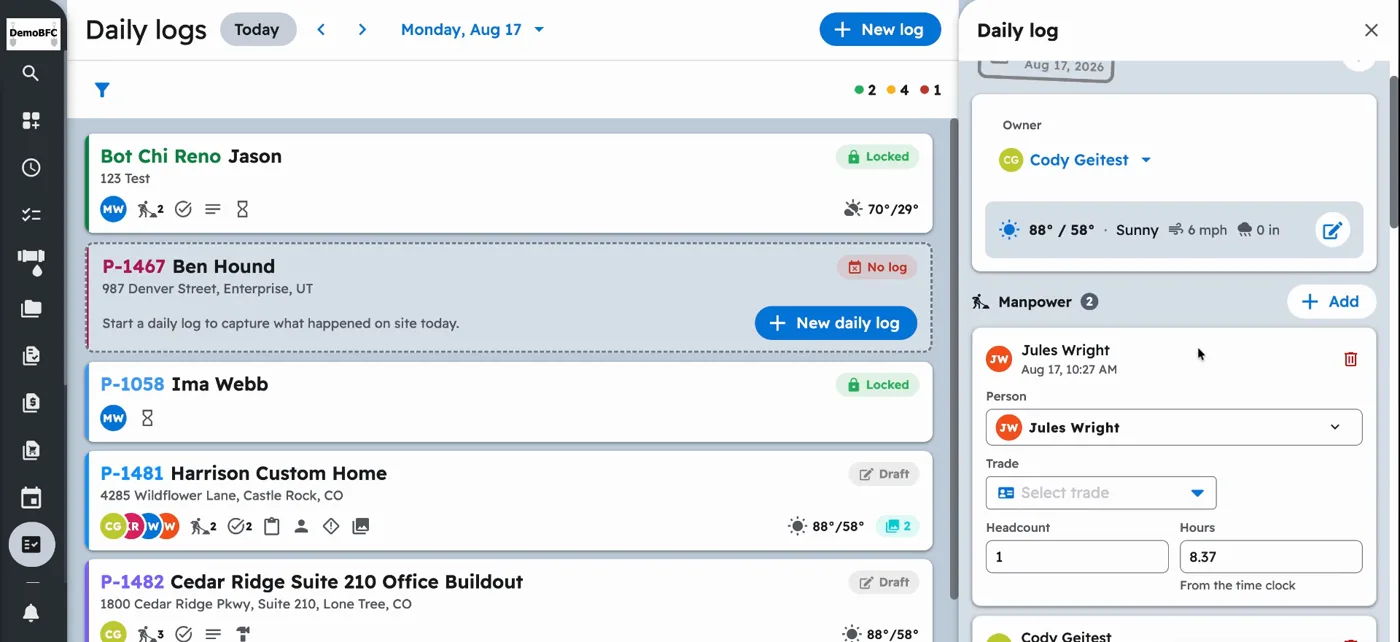
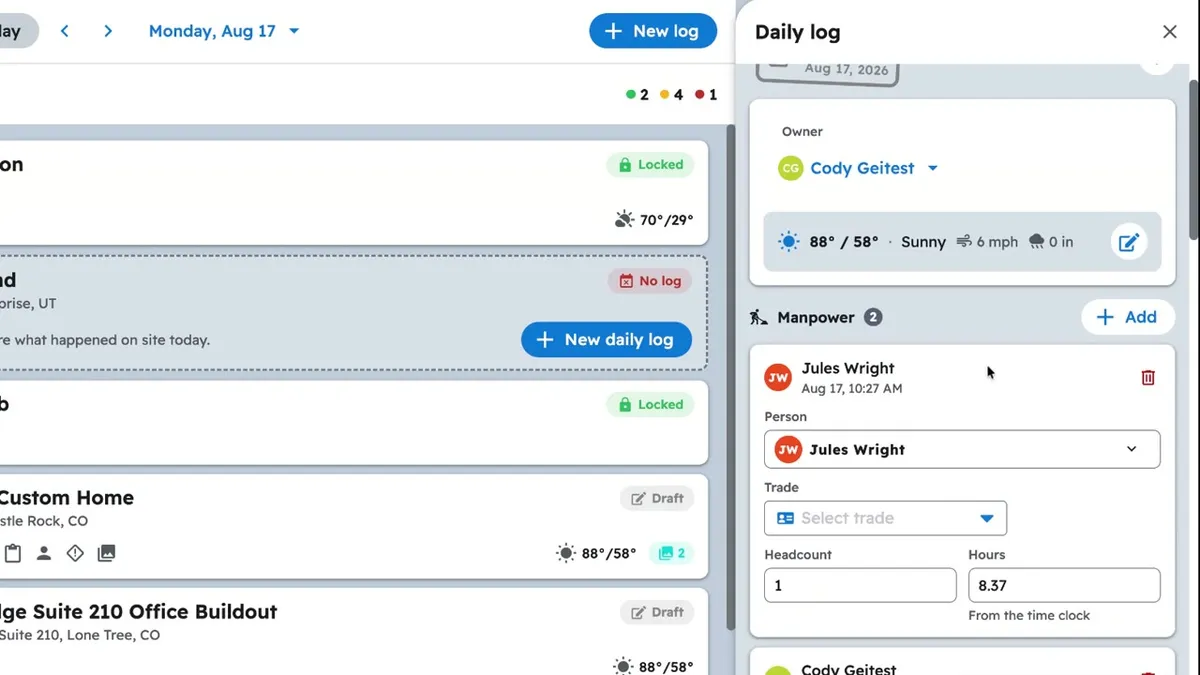
Projul’s daily log feature is structured to capture what matters for construction projects. Every log entry includes:
Weather conditions. Temperature, precipitation, wind. This matters for scheduling, concrete pours, paint application, and roofing. It also matters for disputes about delays. If the log shows rain for three straight days, you have documentation for why the project fell behind.
Crew on site. Who showed up, how many workers, and what trades were represented. This feeds into your labor records and helps verify payroll against actual attendance.
Work completed. A summary of what got done that day. Specific enough to be useful but not so detailed that your crew won’t fill it out. “Completed second floor framing. Began roof sheathing on south side.” That’s enough.
Notes and issues. Anything unusual. Material delays, inspector visits, client requests, safety concerns, subcontractor no-shows. These notes become your record of everything that didn’t go according to plan.
Photos. Crews snap photos directly from their phone and they attach to the daily log automatically. Progress photos, site conditions, material deliveries, problems, completed work. Photos are tied to the specific project and date, so they’re always findable.
Equipment on site. What equipment was used or delivered. Useful for rental tracking and job costing.
The structured format keeps logs consistent across all your projects and all your crews. Whether it’s your most detail-oriented PM or your least tech-savvy crew lead, the log captures the same information every time.
Digital vs. Paper Daily Logs
Paper daily logs have been the standard in construction for decades. They also have some serious problems that cost you time and put you at risk.
Paper sits in a truck until someone remembers to turn it in. Sometimes that’s the next day. Sometimes it’s the next week. Sometimes it’s never. By the time it reaches the office, the details are fuzzy and the information is stale.
Handwriting is illegible. Your crew works with their hands all day. Their handwriting reflects that. If you can’t read the log, it’s useless.
Paper gets damaged. Coffee stains, rain, mud. Construction sites aren’t kind to paper. A daily log that got left on the dash and faded in the sun isn’t going to help in a legal dispute.
Paper is hard to search. Need to find the daily log from a specific date eight months ago? Good luck digging through file boxes. With Projul, you search by date, project, or crew member and find it in seconds.
Paper can’t include photos. At best, someone prints a photo and staples it to the form. That never happens consistently. In Projul, photos are part of the daily log, attached and timestamped automatically.
Paper has no backup. If the filing cabinet gets damaged, the logs are gone. Projul’s digital logs are stored in the cloud and backed up automatically.
The switch from paper to digital isn’t about being tech-forward. It’s about protecting your business and saving your office staff from chasing down paper forms that should have been submitted days ago.
Task and To-Do Alerts
Projul sends automatic mobile notifications when tasks and to-do items are scheduled or overdue. With no per-user fees and unlimited projects, every crew member gets alerts without extra cost per person.
Workers forget. Sticky notes get lost. Things slip through the cracks on busy days. Projul organizes your projects and keeps your whole team engaged. Workers with clear task assignments and automatic reminders are more efficient and more productive.
When a to-do item is overdue, Projul flags it. Your crew lead can see which items are behind and address them before they snowball into bigger problems. And because the alerts go to the worker’s phone, they don’t need to check a whiteboard or ask the foreman what’s next.
Upcoming task reminders give workers time to prepare. If tomorrow’s task requires specific materials or tools, the reminder gives them a heads-up to get ready. No more showing up to the job site and realizing you left the tile saw at the other job.
Real-Time Progress Tracking
Projul automatically updates project progress as tasks and to-dos are completed. No chasing down workers or combing through jobs to figure out where things stand. The progress bar moves as work gets done.
This matters for several reasons:
Progress billing. When you can see that a project is 60% complete based on actual task completion, you have justification for a progress payment. You’re not guessing or estimating completion. You have data.
Client updates. Homeowners want to know how their project is going. Real-time progress tracking gives you an answer without making phone calls or visiting the job site.
Identifying problems early. If a phase is falling behind, you see it in the progress tracking before it becomes a crisis. You can reallocate resources, adjust the schedule, or have a conversation with the crew lead while there’s still time to fix it.
Reducing status meetings. A lot of contractors waste time on daily or weekly status meetings where each PM reports on their projects. When progress is tracked in real time, those meetings get shorter or go away entirely. The data speaks for itself.
Contractors using Projul save 2+ hours daily that used to go toward manual status checks and follow-ups. The project timeline and Gantt view always show overall progress, making it easy to see where every job stands at a glance.
Compliance Documentation Made Simple
Many jurisdictions require daily documentation on construction sites, especially for commercial work. OSHA regulations, local building departments, and general contractors on large projects often mandate daily logs as part of compliance.
Projul’s daily logs give you a consistent, timestamped record that satisfies these requirements. Photos, crew counts, weather data, and work summaries are all in one place and easy to export or share when an inspector or GC asks for documentation.
For contractors working on government projects or as subcontractors on large commercial jobs, having reliable daily documentation isn’t optional. It’s a contract requirement. Projul makes it simple enough that your crews actually do it.
Building a Culture of Documentation
The hardest part of daily logs isn’t the software. It’s getting your crew to do it consistently. Here’s what works.
Make it part of the routine. Daily logs happen at the end of every work day, just like cleaning up the job site. It’s not optional. It’s part of the job.
Keep it quick. Projul’s daily log takes about two minutes to fill out. Weather, crew count, work summary, a photo or two, and any notes. That’s it. If it took 20 minutes, nobody would do it.
Show the value. When a daily log saves you in a dispute or helps you answer a client question in 10 seconds, share that story with your crew. They’ll understand why it matters.
Lead by example. If the PM fills out logs for their projects, the crew leads follow. Documentation starts at the top.
Attach Photos and Track Time From Your To-Dos
Add photos to any task or daily log right from the field. Your crew snaps a picture of the finished work, the material delivery, or the problem they found, and it’s attached to the project permanently. No more digging through camera rolls or text threads to find that photo from two weeks ago.
Pair it with time tracking so your crew logs hours against the same tasks they’re checking off. When labor hours and task completion are tied together, you get accurate job costing without any extra effort from your crew.
To-Dos That Feed Your Schedule and Projects
Every to-do ties into project management and scheduling. When a task gets completed, your project progress updates automatically. No status meetings required. No separate spreadsheet to update. The work gets done, the progress bar moves, and everyone can see it.
At $4,788/year with no per-user fees, your entire team has access to to-dos, daily logs, and every other feature in Projul. Your crew lead creates to-dos from the field. Your PM reviews daily logs from the office. Your workers check off items from their phones. Everyone is working in the same system, and nothing gets lost between the field and the office.