
Construction Drone Inspections: A Practical Guide to Roof Surveys, Progress Photos, and FAA Compliance | Projul
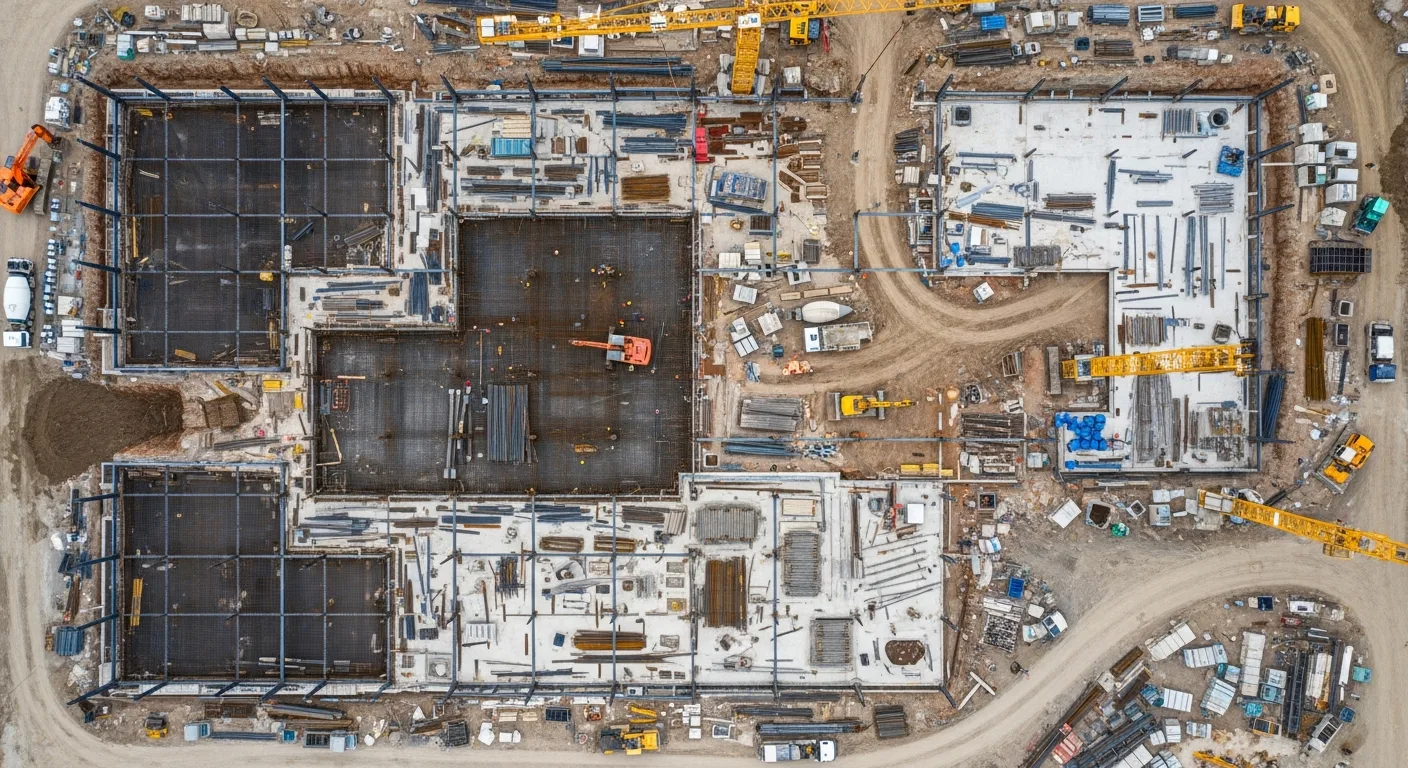
If you’ve ever sent someone up a ladder to photograph a damaged roof, or tried to explain project progress to a client using ground-level phone photos, you already know the limits of working without aerial visibility.
Drones have gone from expensive toys to everyday construction tools. Roofers use them to bid jobs without climbing. General contractors use them to document progress for owners and lenders. Inspectors use them to spot problems that would take hours to find on foot.
This guide covers how to actually put drones to work on your projects: what equipment to buy, how to stay legal with the FAA, and how to turn aerial data into something that makes your business money.
Why Contractors Are Adding Drones to Their Toolkit
The construction industry was slow to pick up drones, but that’s changed fast. Here’s what’s driving adoption:
Safety first. Every time someone doesn’t climb a roof, scaffold, or ladder to take photos, you’ve eliminated a fall risk. OSHA data shows falls remain the number one cause of death in construction. A $2,000 drone is cheap compared to a single workers’ comp claim.
Speed. A drone can photograph an entire roof in 10 minutes. Walking it takes an hour or more, assuming you can safely access every section. For large commercial sites, aerial mapping that would take a survey crew days can be done in a single morning.
Client confidence. Owners, architects, and lenders want to see progress. Aerial photos and videos tell a story that ground-level snapshots simply can’t match. Several contractors we’ve talked to say drone updates cut their inbound “status check” calls in half.
Documentation that holds up. Timestamped, GPS-tagged aerial photos create a record that’s hard to dispute. Whether you’re filing an insurance claim, defending against a delay accusation, or proving work was completed before a storm hit, drone imagery gives you solid evidence.
Getting Legal: FAA Part 107 in Plain English
Before you buy a drone, understand the rules. The FAA regulates all commercial drone flights in the United States, and construction inspections count as commercial use.
The Part 107 Certificate
Anyone flying a drone for business purposes needs a Part 107 Remote Pilot Certificate. Here’s what that involves:
-
Study. The FAA knowledge test covers airspace classifications, weather theory, drone performance, regulations, and flight operations. Most people study for 2 to 4 weeks using online courses.
-
Take the test. Schedule your exam at an FAA-approved testing center. The test is 60 multiple-choice questions, and you need 70% to pass. It costs about $175.
-
Apply. After passing, apply through the FAA’s IACRA system. Your certificate typically arrives within a few weeks.
-
Stay current. You must complete recurrent training every 24 months. The FAA now offers free online recurrent courses, so this is painless.
Key Rules to Know
- 400-foot ceiling. You can’t fly above 400 feet AGL (above ground level) unless you’re within 400 feet of a structure and don’t go more than 400 feet above that structure.
- Visual line of sight. You must be able to see your drone at all times without binoculars or other aids.
- Daylight operations. You can fly during civil twilight (30 minutes before sunrise to 30 minutes after sunset) with proper anti-collision lighting.
- No flying over people. Unless your drone qualifies under one of the Part 107 subcategories for operations over people. Most construction drones with updated firmware now meet Category 1 or 2 requirements.
- Airspace authorization. In controlled airspace (near airports), you need LAANC approval before flying. Apps like AirMap, Aloft, and DJI FlySafe handle this in minutes.
When You Need a Waiver
Some operations require an FAA waiver, which can take weeks or months to process:
- Flying at night without anti-collision lights
- Operations beyond visual line of sight
- Flying over people with drones that don’t meet the subcategory requirements
- Multiple drones operated by one pilot
Plan ahead if your project requires any of these.
Choosing the Right Drone for Construction Work
Not every drone is built for jobsite conditions. Dust, wind, temperature swings, and tight spaces all matter. Here’s what to look for:
Must-Have Features
- Camera quality. At minimum, a 1-inch sensor with 20MP resolution. For detailed inspections, look for drones with zoom capability (optical, not digital).
- Flight time. 30 minutes or more per battery. Carry at least 3 batteries per day of flying.
- Obstacle avoidance. Construction sites are full of cranes, scaffolding, and power lines. Multi-directional obstacle sensing prevents expensive crashes.
- Wind resistance. Look for drones rated to handle at least 25 mph winds. Jobsites are often exposed, and wind speeds at 200 feet are higher than at ground level.
- GPS and RTK. Standard GPS is fine for photos and video. If you’re doing volumetric measurements or site mapping, RTK (Real-Time Kinematic) positioning gives you centimeter-level accuracy.
Popular Models for Contractors
| Drone | Best For | Price Range |
|---|---|---|
| DJI Mavic 3 Enterprise | General inspections, photos, video | $3,500 to $5,000 |
| DJI Matrice 350 RTK | Large site mapping, heavy payloads | $8,000 to $12,000 |
| Autel EVO II Pro | Inspections, good in wind | $2,000 to $3,000 |
| DJI Mavic 3 Thermal | Thermal + visual inspections | $4,500 to $6,000 |
| Skydio 2+ | Autonomous flight, tight spaces | $1,500 to $2,500 |
For most small to mid-size contractors, a Mavic 3 Enterprise or Autel EVO II Pro covers 90% of use cases.
Thermal Cameras: When You Need Them
Thermal-equipped drones spot things the naked eye can’t:
- Moisture intrusion in roofing and walls
- Insulation gaps in building envelopes
- Electrical hot spots on panels and connections
- HVAC performance issues showing up as temperature differentials
If you do roofing, weatherproofing, or energy work, a thermal drone pays for itself quickly.
Inspection Types: What Drones Do Best on Construction Sites
Roof Inspections
This is where drones made their first big impact in construction. Instead of setting up ladders or lifts, you fly a 2-pound aircraft over the roof and capture high-resolution photos of every square foot.
What to capture:
- Overall roof condition from multiple angles
- Close-ups of flashing, penetrations, and transitions
- Damage areas with zoom shots for detail
- Gutter and drainage conditions
- Comparison shots from previous inspections
Pro tip: Fly a grid pattern at consistent altitude for full coverage. Most mapping software can stitch these into a single orthomosaic image of the entire roof.
Progress Documentation
Weekly or biweekly drone flights create a visual timeline of your project that’s worth its weight in gold.
Best practices:
- Fly from the same takeoff point each time
- Capture the same angles and altitudes for consistent comparison
- Include wide shots of the full site and close-ups of active work areas
- Store photos with date, time, and GPS data intact
This documentation protects you during disputes, supports pay applications, and gives clients something tangible to show their stakeholders.
Site Surveys and Mapping
Before breaking ground, a drone survey gives you:
- Topographic data for grading plans
- Volumetric measurements for cut and fill calculations
- Existing conditions documentation for pre-construction records
- Boundary and setback visualization when overlaid on site plans
For mapping work, you’ll need photogrammetry software like DroneDeploy, Pix4D, or OpenDroneMap. These tools stitch hundreds of photos into 2D maps and 3D models.
Structural Inspections
Drones with zoom cameras can inspect:
- Bridge decks and undersides
- Building facades and curtain walls
- Parking structures
- Water towers and storage tanks
- Cell towers and transmission lines
Areas that previously required scaffolding, rope access, or boom lifts can often be inspected by drone in a fraction of the time.
Building a Drone Program for Your Company
Buying a drone is easy. Building a program that consistently delivers value takes more thought.
Assign a Pilot
Pick one or two people on your team to become your certified pilots. They should be:
- Detail-oriented and safety-conscious
- Comfortable with technology
- Available to fly on a regular schedule
- Willing to study for and maintain their Part 107 certification
Create Standard Operating Procedures
Write down how your company handles drone operations:
- Pre-flight checklist (battery check, firmware updates, airspace verification)
- Flight planning requirements (altitude, pattern, overlap for mapping)
- Photo and video naming conventions
- Data storage and backup procedures
- Maintenance schedule (propeller replacement, sensor cleaning, firmware updates)
- Incident reporting process
Invest in Software
Raw drone photos are useful. Processed drone data is powerful. Consider:
- DroneDeploy or Pix4D for mapping and 3D models
- OpenSpace or Cupix for interior documentation
- Bluebeam or PlanGrid for overlaying drone imagery on plans
And of course, a solid project management platform like Projul ties all your project documentation together, so drone photos live alongside schedules, budgets, and communication logs.
Track Your ROI
Keep a simple log of how drone inspections save you money:
- Hours saved vs. manual inspection methods
- Safety incidents avoided
- Bids won because of professional aerial presentations
- Change orders supported by drone documentation
- Insurance claims resolved faster with aerial evidence
After a few months, you’ll have hard numbers to justify expanding your drone program.
Using Drone Content to Win More Work
Beyond inspections, drone footage is a marketing weapon.
Proposals and Presentations
Include aerial photos and site maps in your proposals. When a potential client sees that you use aerial documentation, it signals professionalism and thorough project management.
Social Media and Website Content
Aerial construction timelapses get massive engagement on social media. A 30-second flyover of a completed project tells your story better than any written description.
Post drone content on:
- Your company website and portfolio
- Instagram and Facebook
- LinkedIn (especially for commercial work)
- Google Business Profile
Client Updates
Replace your weekly email updates with a short video flyover. Clients share these with their own stakeholders, which extends your brand reach to people you’ve never met.
Common Mistakes to Avoid
Flying without checking airspace. Even rural areas can have airspace restrictions. Check every time, every location.
Ignoring weather conditions. Wind, rain, and extreme temperatures affect drone performance. Don’t push it when conditions are marginal.
Poor data management. Thousands of aerial photos are useless if you can’t find them. Set up a folder structure by project, date, and flight type from day one.
Skipping maintenance. Drones need regular attention. Replace propellers on schedule, clean sensors, update firmware, and calibrate the compass and IMU regularly.
Flying too close to structures. Maintain safe distances from buildings, cranes, and power lines. One crash can destroy an expensive drone and potentially injure someone below.
Not having insurance. Standard general liability doesn’t cover drone operations. Get a drone-specific policy or rider. Hull coverage protects your equipment, and liability coverage protects you if something goes wrong.
The Future of Drones in Construction
Drone technology keeps getting better and cheaper. Here’s what’s coming:
- Autonomous flight paths that repeat the same inspection route at scheduled intervals
- AI-powered defect detection that flags cracks, ponding water, and missing materials automatically
- LiDAR integration for precise 3D scanning even in poor lighting conditions
- Indoor flight capabilities for inspecting mechanical rooms, attics, and crawl spaces
- Real-time streaming to remote stakeholders during inspections
Contractors who build drone skills now will be well-positioned as these capabilities mature.
Getting Started: Your First 30 Days
Here’s a practical roadmap:
Week 1: Sign up for a Part 107 study course. Order your drone (it’ll arrive before you’re certified).
Week 2: Study for the exam. Set up your data management system, including folders, naming conventions, and backup procedures.
Week 3: Take and pass your Part 107 test. Practice flying in an open area away from obstacles.
Week 4: Fly your first real project inspection. Start simple: a roof survey or progress photo set. Review the results, refine your process, and plan your next flight.
Within 30 days, you’ll have a certified pilot, working equipment, and your first set of aerial project data. From there, it’s about building the habit and expanding your capabilities one project at a time.
Drones aren’t a gimmick. They’re a practical tool that saves time, improves safety, and gives your clients something they can see and trust. The contractors who figure this out now will wonder how they ever ran projects without them.
Frequently Asked Questions
Do I need a license to fly a drone on my construction site?
How much does it cost to start doing drone inspections in-house?
Can I use drone photos for insurance claims or warranty disputes?
What kind of drone is best for construction inspections?
How often should I fly drone inspections on an active project?
Can I fly a drone in a city or near an airport?
Do clients actually care about drone photos?
What about privacy concerns with construction drones?
Related Articles

BIM Clash Detection: How to Catch Conflicts Before They Cost You on the Jobsite
BIM Clash Detection: How to Catch Conflicts Before They Cost You on the Jobsite Every contractor has a story about the...
Read More →
Asphalt Paving and Compaction Guide: Mix Types, Laydown Temperatures, and Quality Testing
Asphalt paving looks straightforward from a distance. A truck dumps material, the paver lays it down, and rollers...
Read More →
Construction Jobsite Wi-Fi & Connectivity Guide: Setting Up Reliable Internet in the Field
A practical guide to getting reliable internet on construction job sites. Learn about cellular hotspots, mesh networks,...
Read More →