
Construction Software That Works With ChatGPT and Claude (2026)
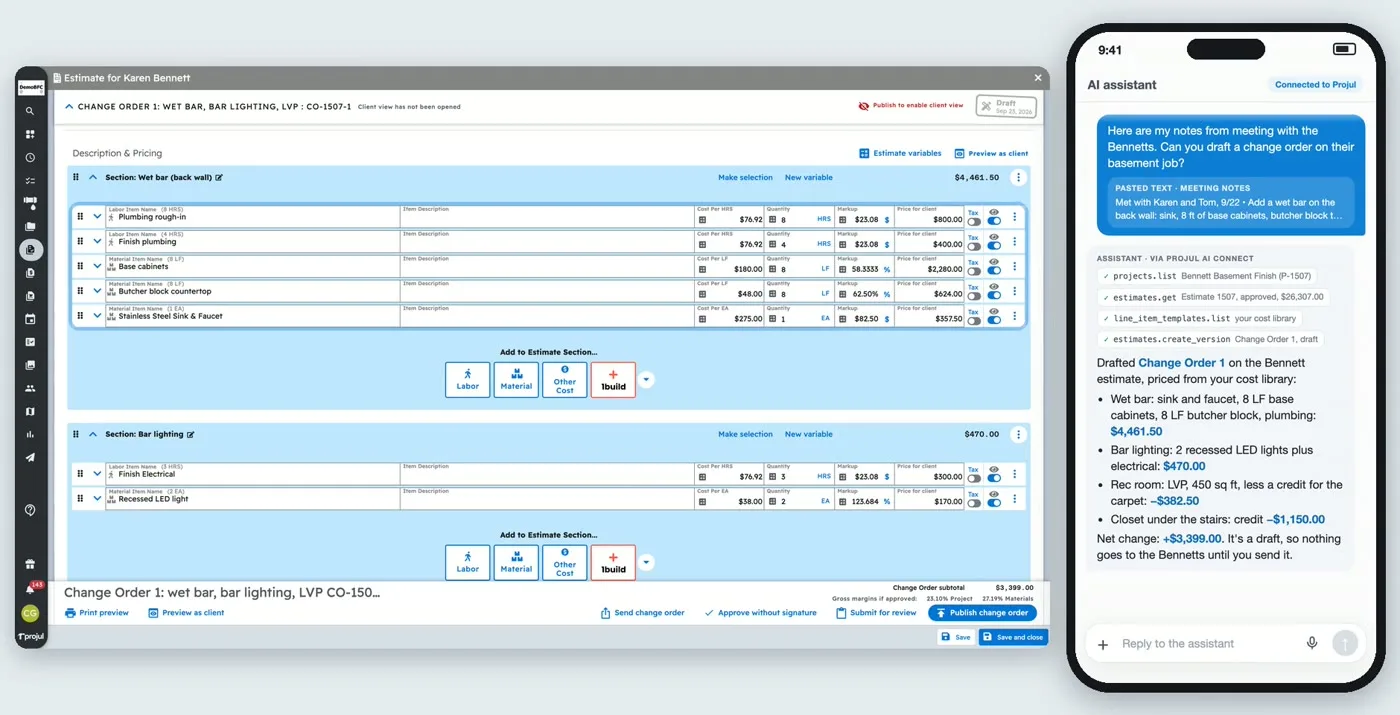
ChatGPT and Claude are no longer just for drafting emails. In 2026, some construction software lets your AI assistant work inside your account: look up a job, add a lead from a voicemail, or draft a change order from meeting notes. Most contractor software still can’t do this, though.
This guide covers which construction and contractor tools have their own connector as of October 2026, what each one can do, and how to set one up. We make Projul, so it’s on the list, and we’ve linked each competitor’s own documentation so you can check the details yourself.
The Short Answer
Construction and contractor software with a first-party ChatGPT or Claude connector (as of October 20, 2026):
| Software | Works with | How it connects | Can it change data? |
|---|---|---|---|
| Projul | ChatGPT, Claude, Cursor, Zapier, Make, n8n | Projul AI Connect, an MCP server | Yes: leads, jobs, schedule, draft estimates and change orders. Can’t send anything to clients. |
| JobTread | ChatGPT | App in the ChatGPT apps directory | Lists searching and creating jobs, estimates, budgets, schedule and daily logs |
| Jobber | ChatGPT, Claude | ChatGPT plugin and Claude connector | Reads clients, jobs, quotes and invoices; can create requests, clients, properties and quotes |
| CompanyCam | Claude, ChatGPT, Cursor | MCP server (beta) | Read-only or read and write, set by an admin |
| QuickBooks | Claude | Official connector | Accounting data, not project management |
For Procore and Buildertrend, we didn’t find a first-party ChatGPT or Claude connector. Third-party MCP servers and integration services exist for both, but they are built and supported by other companies.
What “Running Your Software From ChatGPT” Actually Means
There are two very different things people mean by this.
1. Asking an AI about construction. Any AI assistant can help you write a scope of work, explain a lien waiver, or turn notes into a punch list. It doesn’t know anything about your jobs unless you paste the information in.
2. Connecting the AI to your software. With a connector, the assistant can look things up in your account and make changes when you ask. “Add a lead for the Hendersons from this voicemail.” “What jobs start next week?” “Draft a change order for the upgraded tile from these notes.” This is what this guide is about.
Most connectors use MCP (Model Context Protocol), an open standard that ChatGPT, Claude, and developer tools like Cursor support. When a software company offers an MCP server, you add it to your assistant once, and the assistant can use it from then on.
Construction Software With ChatGPT and Claude Connectors
Projul
Projul AI Connect is an MCP server included with the Projul Pro plan. It works with ChatGPT and Claude, plus Cursor, Windsurf, and Claude Code, and the same key connects Zapier, Make, and n8n.
What contractors use it for:
- Turning a voicemail or email into a new lead
- Drafting an estimate from a template, or a change order from meeting notes
- Shifting the schedule when a delivery runs late
- Updating prices in the cost library from a supplier price list
- Asking what’s on the schedule for the week ahead
What it can’t do: it can’t send or approve an estimate or change order, and it can’t text or email your customers. A person on your team always sends anything that reaches a client. It doesn’t create invoices or work with the time clock, payroll, daily logs, or purchase orders yet.
Setup takes about five minutes: an owner or admin creates a key in Projul settings (read-only or read and write), then adds it as a connector in the AI tool. Step-by-step guides for each tool are in the Projul Help Center.
JobTread
JobTread has an app in the ChatGPT apps directory. The listing says it can search and create jobs, review estimates and line-item costs, compare budgets with actual costs, view the schedule, manage client and contact records, and work with daily logs.
Jobber
Jobber launched a ChatGPT plugin and a Claude connector in September 2026 (Jobber’s announcement). According to Augmented Trades’ review, it can read clients, jobs, invoices, and quotes, and with permission create requests, clients, properties, and quotes. It can’t create or edit jobs or invoices, delete records, or change schedules. Jobber is built mainly for home and field service businesses rather than construction projects.
CompanyCam
CompanyCam offers an MCP server, in beta as of October 2026, that works with Claude, ChatGPT, and Cursor. An admin turns it on and chooses read-only or read-and-write access. It’s for photo documentation, so most contractors use it alongside a project management system.
QuickBooks
Intuit has an official QuickBooks connector for Claude. It’s useful for accounting questions, but it doesn’t manage projects, schedules, or estimates.
Procore and Buildertrend
We didn’t find a first-party ChatGPT or Claude connector from either company as of October 20, 2026. Procore offers developer APIs, and third-party services sell MCP servers or integration layers for both platforms. Those can work, but they’re supported by someone other than the software company, and some need a developer to set up.
How to Choose a Construction Tool for AI
If you want to run part of your business from ChatGPT or Claude, check these five things:
- Is the connector built by the software company? A first-party connector is supported and updated with the product. Third-party bridges can break when either side changes.
- What can it change? Read-only is a safe start. If you turn on write access, know exactly which records the AI can create or edit.
- Can it send anything to a client? A connector that can email customers or send estimates without a person approving them is a risk. Look for one that keeps client-facing actions in human hands.
- Which assistants does it support? Your office may use ChatGPT while your estimator prefers Claude. Check that the connector supports the assistants your team uses.
- Which plan includes it? Connectors are often limited to certain plans. Check before you count on it.
Getting Started
Start small. Pick one repetitive job, like entering leads from voicemails or building change orders from site notes, and let the assistant draft it while someone checks the result. Once your team trusts it, add the next task.
If you want to see Projul AI Connect working in a real account, book a demo or watch the walkthroughs on the Projul AI Connect page.
Frequently Asked Questions
Which construction software can I run from ChatGPT or Claude?
What is an MCP server?
Can ChatGPT or Claude send estimates to my clients?
Do I need to know how to code to connect construction software to ChatGPT or Claude?
Is it safe to connect my construction software to an AI assistant?
Related Articles
Best Software for Remodeling Contractors (2026): 7 Options Compared
Remodelers need software that handles change orders, client selections, occupied-home communication and tight margins....
Read More →
5 Best Fieldwire Alternatives for Contractors in 2026
Fieldwire is solid for field management, but it won't run your whole business. If you need more than task tracking and...
Read More →
4 Best JobTread Alternatives for Contractors in 2026
JobTread does estimating and budgeting well. But it isn't the right fit for every contractor. Here are 4 alternatives...
Read More →